
Learn the Organization
Last updated 9 April 2025
Understand the layout — and master your workspace.
bolder.fit is built with clarity in mind, using powerful modules that support both your daily tasks and long-term coaching goals.
🧭 Navigation Menu Overview
Located on the left side of your screen, the navigation menu gives you quick access to all key areas:
- 🏠 Home
Your main dashboard for client and plan summaries.
- 📈 Activity Feed
View real-time updates on client actions, completed plans, or progress logs.
- 🗂️ My products
Create, manage, and reuse saved or shared training and nutrition programs.
- 💳 My wallet
Monitor transactions, subscriptions, and any payouts or billing settings.
- ✨ Ask AI (Beta)
Use our in-app assistant to get help or ideas instantly—from workout suggestions to onboarding tips.
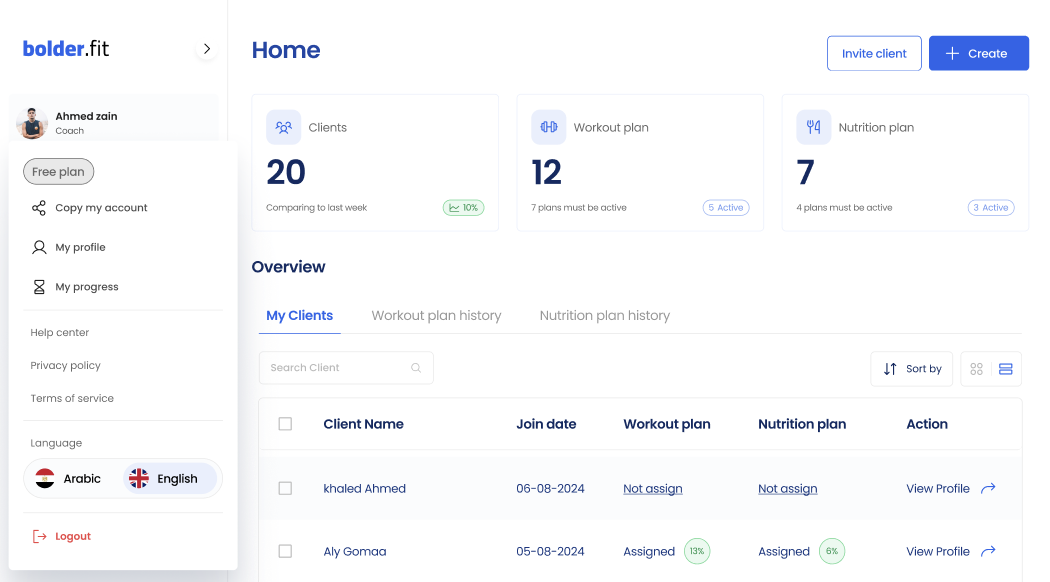
Profile Panel
At the top of the sidebar, you’ll find your profile panel:
- Name and Role
Displays your full name and role (e.g., Ahmed Zain – Coach).
- Profile Image
A profile photo or initial-based avatar for quick personal identification.
- Dropdown Menu (on click)
Gives access to:
- Copy account link
- My Profile
- Subscription details
- Help center
- Privacy policy
- Terms of service
- Language options
- Log out option